The Best Free Teleprompter
for Your Browser
Read your script while you look straight into the lens. Record from your webcam, save the video to your desktop, and keep your scripts in sync with the Eranol iOS app.
- Free in your browser
- No download
- Video stays on your device
- Syncs with the iOS app
Free
Online Teleprompter
No Download
Runs in Your Browser
Private
Video Stays on Your Device
Synced
Web + Eranol iOS App
Record
Webcam & Microphone
Import
TXT, MD and CSV
20 Speeds
Scales with Font Size
Hands-Free
Keyboard Shortcuts
Everything on One Screen
No installs, no uploads, no watermark. Open the page, pick a script and start talking.
Works on desktop
Built for laptops and external webcams, with big controls and keyboard shortcuts.
Private by default
Recording stays in your tab. Nothing is uploaded unless you sign in and save a script.
Sync when you want it
Sign in to save scripts to your account and pick them up on your phone.
Write on Your Laptop.
Record on Your Phone.
Sign in and every script you save on the web shows up in the Eranol iOS app, and the other way round. Folders, titles, statuses and your latest edits stay in step, because both apps read the same account.
- Draft long scripts with a real keyboard
- Shoot on your phone camera with the same script
- Status flips to Completed once a take is saved
Product launch
320 words
ReadyWeekly vlog
540 words
DraftCourse intro
180 words
CompletedTestimonial
260 words
RecordedSee How It Works
From a pile of scripts to a finished take. Everything here is in the Eranol iOS app, and your scripts follow you between the app and the web.
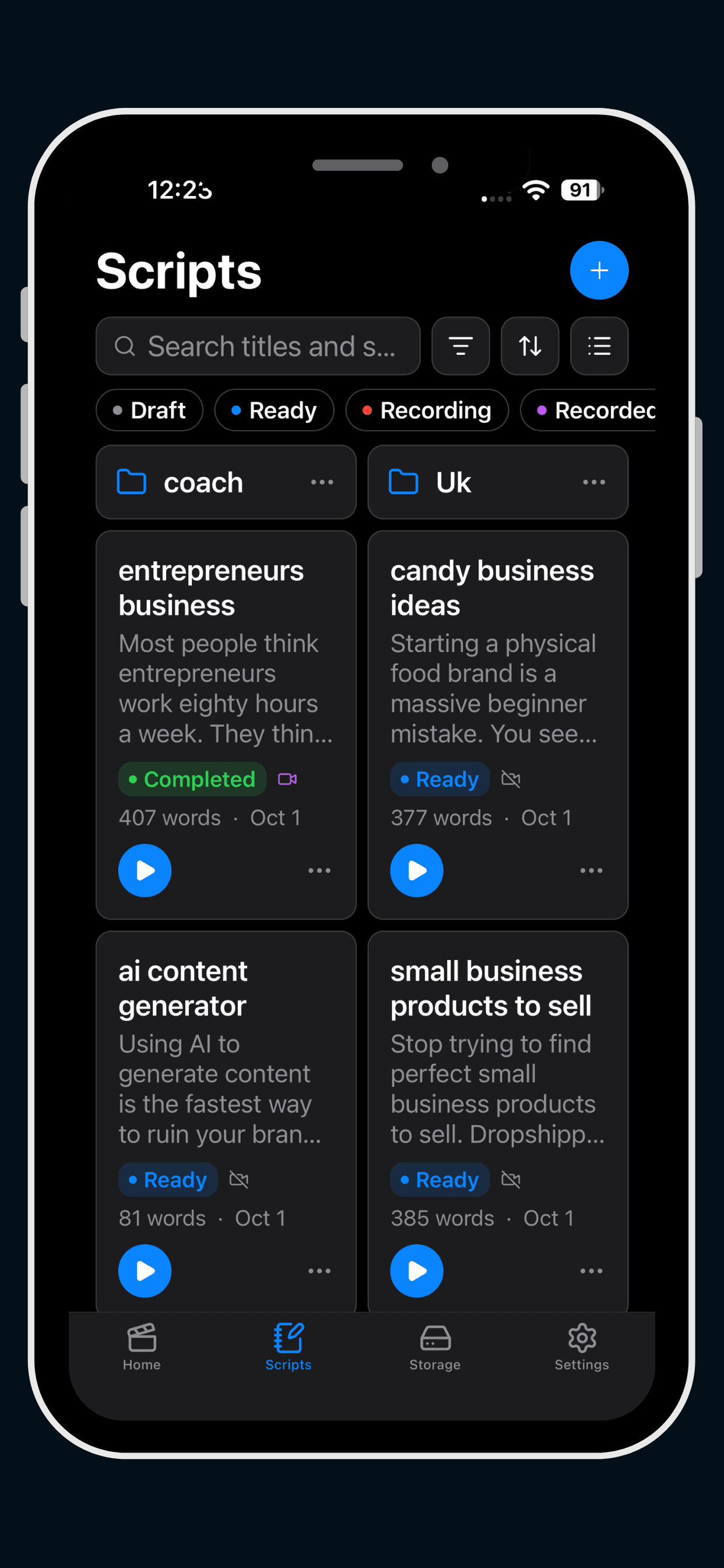
01 · Script library
Every script, organised in one place
Your scripts live in folders, each card showing its title, an opening line, word count and date. The same library is on the web when you sign in, so a script written on your laptop is already on your phone.
- Search titles and script text
- Filter by Draft, Ready, Recording, Recorded or Completed
- Folders and subfolders keep a big batch tidy
02 · Read it first
Check the length before you hit record
Open a script to read it at full size. The word count and estimated speaking time are right at the top, so you know whether it fits your video before the camera is rolling.
- Word count and estimated read time
- Large, easy-to-read text
- One tap on play to start the teleprompter

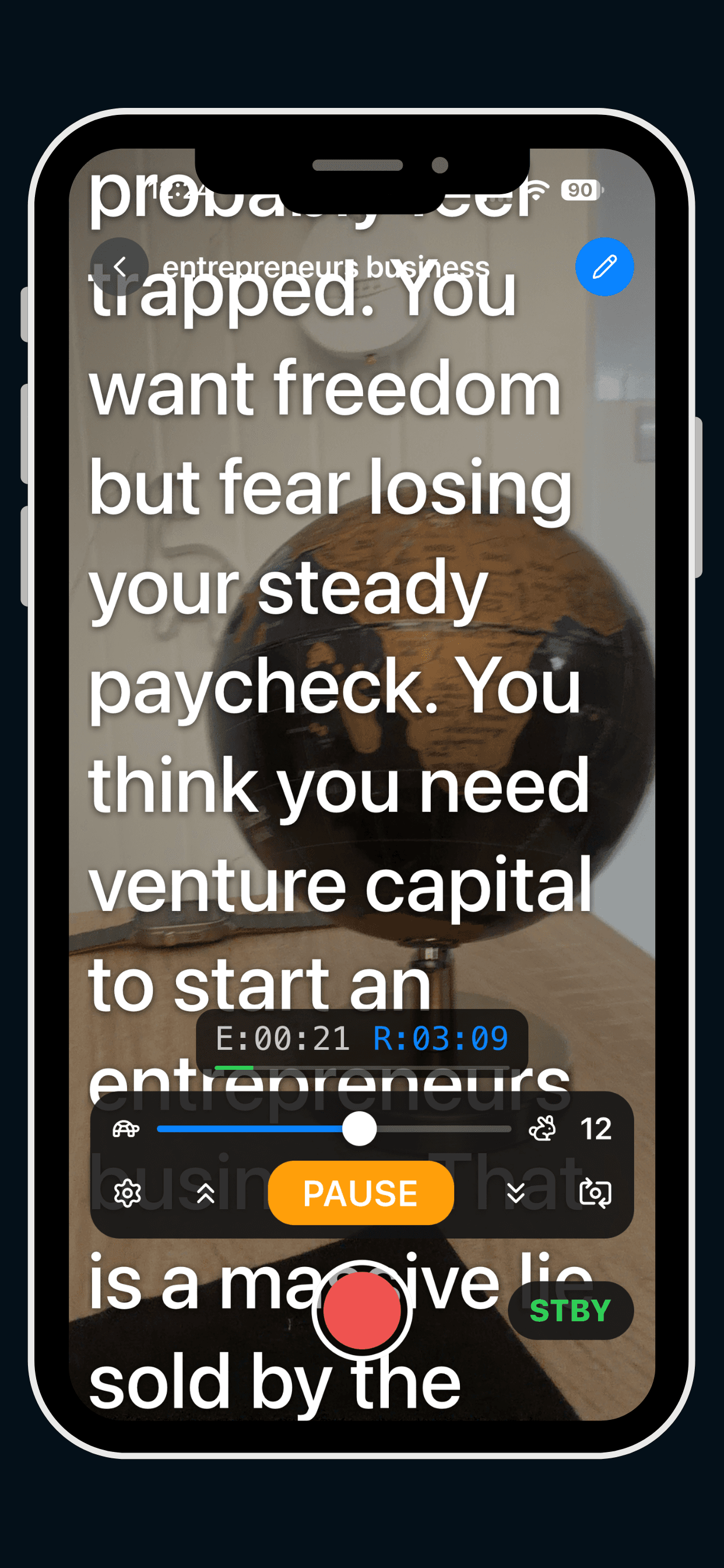
03 · Teleprompter and camera
Read and record in one view
The script scrolls over your camera while you look into the lens. Set the speed with the slider, watch the elapsed and remaining time, and press the red button when you are ready.
- Speed slider from slow to fast
- Elapsed and remaining timer
- Pause, jump to start or end, flip the camera
- STBY and REC so you always know the state
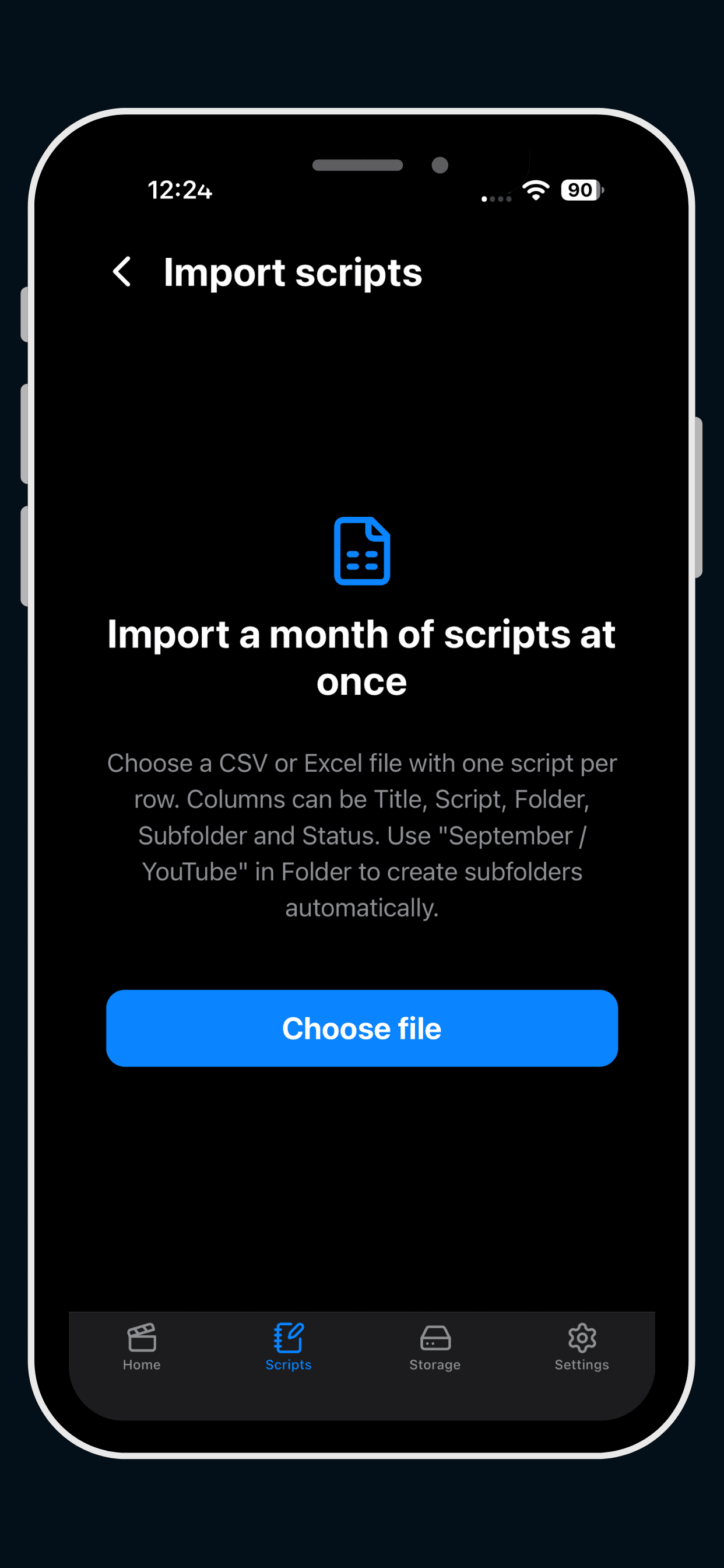
04 · Bulk import
Import a month of scripts at once
Choose a CSV with one script per row. Columns can be Title, Script, Folder, Subfolder and Status, and a folder written as “September / YouTube” creates the subfolders for you. The web version imports CSV, .txt and .md files the same way.
- One script per row
- Folders and subfolders created automatically
- Works on the web and in the iOS app
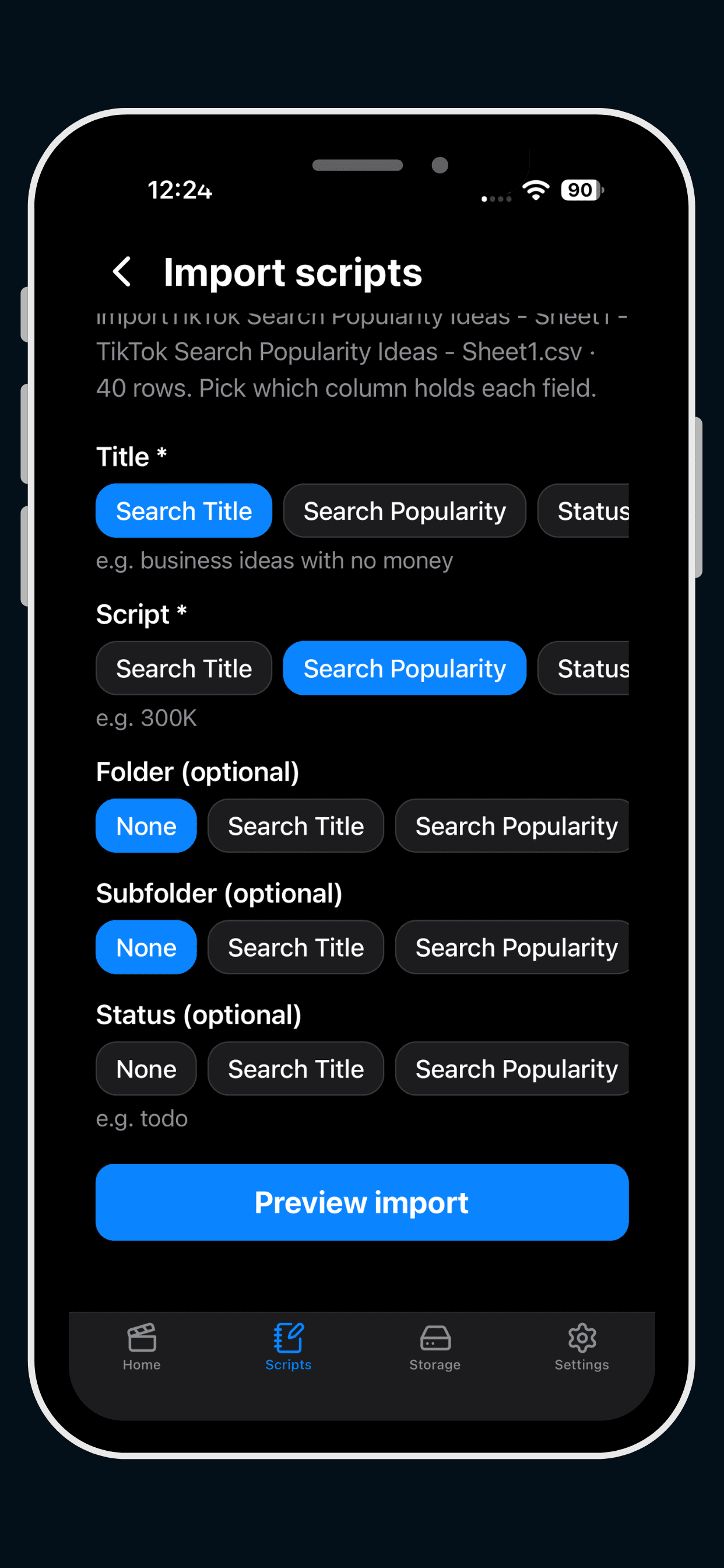
05 · Column mapping
Point each column at the right field
In the iOS app you pick which column holds the title, the script, the folder, the subfolder and the status, then preview the import before anything is saved. On the web, columns are matched by their header names automatically.
- Title and Script are required
- Folder, Subfolder and Status are optional
- Preview before you import
Built for Creators
Everything a talking-head video needs, without the clutter.
Smooth, adjustable scrolling
Twenty speed levels that scale with your font size, a live timer, and a progress bar so you always know how long is left.
Record while you read
The prompter sits over your webcam. Hit record, get a 3-second countdown, and the text starts moving with you.
Saved to your computer
Review the take, then download it. The video never leaves your machine unless you choose to share it.
Made for your eyes
Pick any font size, narrow the text column toward the lens, and flip the text for beam-splitter glass.
Bring your scripts
Paste text, open a .txt or .md file, or import a whole spreadsheet of scripts with folders and statuses.
Hands-free shortcuts
Space to start or pause, R to record, arrow keys for speed. Keep your focus on the camera.
Get Started Easily & Quickly
Write or paste your script
Open the editor, drop in your words, and check the estimated read time.
Set your speed and record
Allow camera access, pick a scroll speed that matches your pace, and press the red button.
Download your video
Watch the take back, then save it to your desktop. Sign in to keep the script for next time.
Frequently Asked Questions
Is the web teleprompter free?+
Yes. You can write a script, scroll it and record from your webcam without an account.
Where does my video go?+
Nowhere. Recording happens in your browser and the file is saved to your computer when you click Download. Closing the tab without downloading discards the take.
Why create an Eranol account?+
Without an account your script is kept only in this browser. With an Eranol account you can save as many scripts as you like, organise them in folders, track each one’s status (Draft, Ready, Completed) and open them from any computer you sign in on.
Can I use my scripts in the Eranol iOS app?+
Yes. Scripts, folders and statuses saved while signed in are stored in your Eranol account, so the same scripts appear in the iOS app. Edit on your laptop, record on your phone, or the other way round.
How do I save a script to my account?+
Sign in, then either press New script in My scripts or click Edit script in the teleprompter and choose Save to my account. Once a script is saved, every change you make autosaves to your account.
Can I import scripts from a CSV file?+
Yes, after you sign in. Go to My scripts and choose Import. A CSV needs a Title column and a Script column, and can also have Folder, Subfolder and Status columns. Every row becomes a script, and missing folders are created for you.
What other files can I import?+
Plain text (.txt) and Markdown (.md) files, where each file becomes one script titled after the file name. You can pick several files at once. A single import can add up to 5,000 scripts, and each file can be up to 5 MB.
How do I organise a big batch of scripts?+
Add Folder and Subfolder columns to your CSV (for example “September” and “YouTube”) and the import builds that folder tree. You can also write it as “September / YouTube” in one Folder cell. Add a Status column with Draft, Ready, Recorded or Completed to set where each script starts.
What happens to my imported scripts if a row has a problem?+
Before anything is saved you see how many scripts are ready and which rows will be skipped, such as a missing title or script or an unknown status. Valid rows still import.
Can I delete my scripts?+
Yes. Delete any script or folder from My scripts. Deleting a folder keeps its scripts and moves them to Unfiled. Deleting a script also removes it from the iOS app, since both read the same account.
What video format will I get?+
MP4 in Safari and WebM in Chrome, Edge and Firefox. If you need MP4, our free video converter does it in a click.
Which browsers work?+
Any current version of Chrome, Edge, Safari or Firefox with a webcam and microphone. Camera access needs HTTPS, which Eranol uses everywhere.
Can I use it without recording?+
Yes. If you skip camera access you still get the scrolling prompter, which you can use with any recording software.